Your template, your files, live in one click
Pick any DragGo template, hand the Agent your logo, a text file and your photos, and it fills the design — writing only what your files leave out, never a fact — then shows every change before you Apply and Publish.
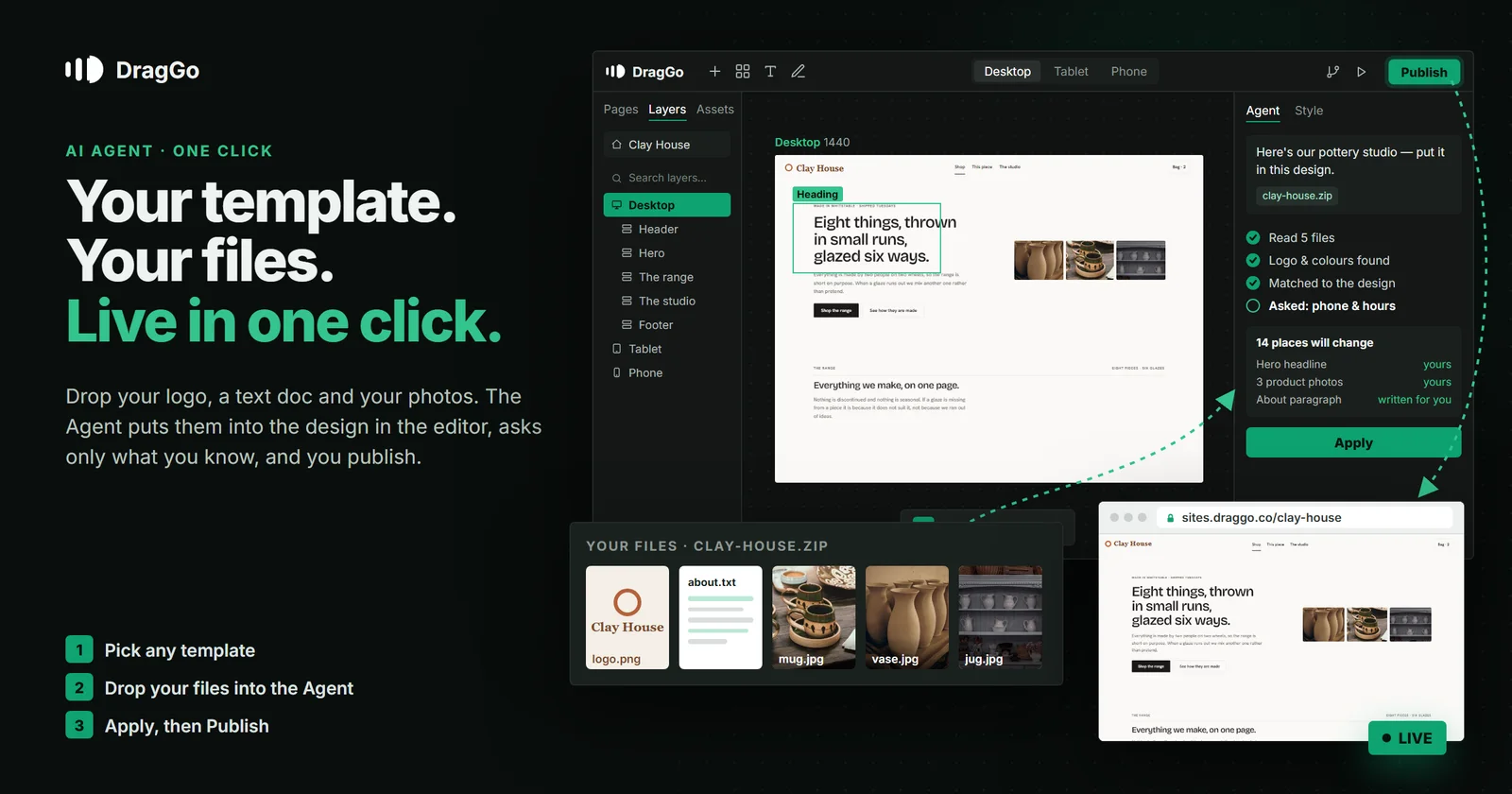
Short answer: pick any DragGo template, then hand the Agent your logo, a text file that says what you do, and your photos — as one zip or a few loose files. It works out what each file is, puts your words and pictures into the template's own places, writes whatever your files leave out without ever inventing a fact, asks for the handful of details only you know, and shows you every change before anything is written. Press Apply, press Publish, and the site is live on a free address.
What you hand over
Everything goes in through the Agent's + button → Your files for this template. A zip keeps its folders; several loose files at once work the same way.
- Your words —
.txt,.md,.docx,.pdfor.csv. A few rough lines is enough. A menu, a price list or an "about us" you already wrote is better. - Your pictures — photos of your work, your place, your team, and your logo. Any common image format.
- Your fonts, if your brand has them —
.woff2,.woff,.ttf,.otf. - Your old website's code, if you have one — a React app, a WordPress theme, a folder of HTML. It is read, never run: the words, the colours and the page list come out of it.
What the Agent does with them
- Works out what each file is. Which picture is the logo, which colours the logo uses, which typefaces you gave it, which file is your text. This part needs no AI model at all — it is reading, not guessing.
- Reads the template's shape. Every place a headline, a paragraph, a photo or a button sits, and how much fits in each.
- Matches the two. Your words go where they belong, your photos go into the picture places, and your logo goes wherever the template keeps its logo. Only if you ask, the template’s accent colour becomes the one from your logo.
- Writes what your files are silent on — and says so. If your text covers the hero and the about section but not the three feature cards, the Agent writes those in your voice and marks every one of them Written for you, so you can see at a glance which lines are yours.
- Never writes a fact. A phone number, an address, a price, opening hours — those only ever come from you. Instead, a short popup asks for them: phone, WhatsApp, email, address, hours, social links, and any photos still missing. Leave a field empty and that place stays hidden rather than filled with something made up.
Nothing happens until you say so
Before a single word lands on the page you get a card that lists every change as its own line — 14 places will change: hero headline, hero photo, 3 product photos, about paragraph… — with "Your words" apart from "Written for you". Hover a line and its place is outlined on the canvas. Untick anything you do not want. Only Apply writes it.
After that it is your site in the editor, the same as if you had built it by hand: move things, restyle them, switch to Tablet or Phone and adjust, or ask the Agent for the next change in plain words.
Then it is live
Press Publish and the site is live on a free sites.draggo.co address with HTTPS. When you are ready, point your own domain at it — every account can connect one custom domain for free, certificate included. A published DragGo site is plain HTML served from our own servers, so a visitor gets the page, not a website builder loading in their browser first.
Why a template and not a blank page
A template is a finished, tested design — the spacing, the type, the rhythm and the phone layout are already right. What usually makes a template look like a template is that the words and pictures were never yours. That is exactly the part this flow replaces. You keep the design that works and everything on it becomes your business.
What it costs
Building, editing, publishing and hosting on DragGo are free. The Agent runs on AI credits: the free plan includes 500 credits on the free models, and a paid plan adds the bigger models and more credits each month. Pricing has the current plans.
Try it
- Open the Marketplace and choose a template.
- Open the Agent, press +, and drop in your files.
- Read the card, press Apply, then Publish.
Start at studio.draggo.co.